A company named Meebo was looking for a "Javascript Ninja".
Being the Javascript Ninja Master that I am (and a humble one , too), I was sought out by a headhunter to interview for the role. I checked them out and thought they were doing some cool DHTML things, so I agreed to interview with them.
Meebo gives a set of "puzzler" questions to candidates to test their Javascript acumen before speaking with them.
A couple of the questions were pretty good ones that made me go "hmmmmmm...?".
I believe I answered them as close to correctly as possible. The interview went well but it became apparent that Meebo was really interested in a Full-Time Employee (FTE) rather than a contractor, which is what I was looking for at the time (due to the whole circumnavigation thing).
Anyway, the puzzler questions, and my answers are presented here.
My apologies to Meebo if they have to come up with fresh ones due to this posting!
Shannon Norrell
Puzzlers
(1.) When does div.setAttribute(”###”) not equal div.###?
Having never found much use for setAttribute() - I always use direct assignment (div.foo=###) - I put together a "test harness" of sorts to test the behavior of setAttribute() so I could answer this question intelligently. Here is the code:
//////////////////////////////////////////////////////////////////////////////////
<!DOCTYPE HTML PUBLIC "-//W3C//DTD HTML 4.01 Transitional//EN">
<html>
<head>
<style type="text/css">
#sampleDiv, #sampleDiv2 { background-color: #FF0000; height: 40px; }
button { background-color: #CCCCCC;}
.comparison { float:left; border:solid 1px green; width:48%; top:0px; margin:5px;}
</style>
<script type="text/javascript">
function doSetup() {
var div = document.getElementById("sampleDiv");
var aStr = "sampleDiv<br/>DIV.Property= example DIV <br/>";
div.innerHTML = aStr;
div.arbitraryProperty="Hello";
div.arbitraryFunction= function() { alert('This is a test'); }
div.onclick = function() { alert('sampleDiv onClick'); }
div.style.backgroundColor='#00FF00';
var div2 = document.getElementById("sampleDiv2");
var aStr = "sampleDiv2<br/>DIV.SetAttribute() example DIV <br/>";
div2.innerHTML = aStr;
if ( navigator.userAgent.toLowerCase().indexOf("firefox") != -1 ) {
div2.createAttribute('arbitraryProperty');
div2.createAttribute('arbitraryFunction');
div2.createAttribute('onclick');
div2.style.createAttribute('backgroundColor');
}
div2.setAttribute('arbitraryProperty',"Hello");
div2.setAttribute('arbitraryFunction', function() { alert('This is a test'); });
div2.setAttribute('onclick', function() { alert('sampleDiv2 onClick'); });
div2.style.setAttribute('backgroundColor','#00FF00');
}
function doEnumeration( anHTMLElement, anOutputContainer ) {
var div = document.getElementById( anHTMLElement );
var aStr = "Enumerated Properties of " + anHTMLElement + "<br/>";
for (property in div) {
aStr += anHTMLElement + '.' + property + ' = '+ div[property] + '<br/>';
}
document.getElementById( anOutputContainer ).innerHTML = aStr;
}
function showDiv2Stuff() {
var div = document.getElementById('sampleDiv2');
alert(div.arbitraryProperty);
}
</script>
</head>
<body onload="doSetup()">
<div class="comparison">
<button onclick="doEnumeration('sampleDiv', 'valuesProperty')">Click to Enumerate</button>
<div id="sampleDiv"></div>
<div id="valuesProperty">Property Values</div>
</div>
<div class="comparison">
<button onclick="doEnumeration('sampleDiv2', 'valuesSetAttribute')">Click to Enumerate</button>
<div id="sampleDiv2"></div>
<div id="valuesSetAttribute">Property Values</div>
</div>
<button onclick="showDiv2Stuff()">
show sampleDiv2 stuff</div>
</body>
///////////////////////////////////////////////////////////////////////////////////////////////
I tested in IE7 and in Firefox 2 and my findings were that using setAttribute() does not work at all as expected in Firefox (even after adding conditional code to use createAttribute() before calling setAttribute() for FF).
So the short answer for this question would be:
div.setAttribute(”###”) does not equal div.### when running under Firefox
It is also interesting to note that arbitrary property assignments appear at the top of the DOM stack for Firefox and at the bottom in IE. Not sure what the implication of this is, as the assignment values resolve identically for either browser.
(2.) What’s the difference between these two statements:
a. var x = 3;
b. x = 3;
a. has local scope, b. has global scope
(3.) What’s the difference between:
a. !!(obj1 && obj2)
b. (obj1 && obj2)
a. will always evaluate to true (why you would have this line of code I can't imagine)
(4.) Write a one-line piece of JavaScript code that concatenates all strings passed into a function:
function concatenate(/*any number of strings*/) {
var string = ""; for (var i=0; i < arguments.length; i++) { string+=arguments[i]; };return string;}
Note - if there were a way to cast the Arguments object into a String object, one could then use .join("")
(5.) What do these two examples have in common?
Example 1:
var obj = document.getElementById(’adiv’);
document.getElementById(’adiv’).ptr = obj;
Example 2:
function assignClick() {
var el = document.createElement(’div’);
function handleClick() {
el.innerHTML = ‘clicked!’;
}
el.attachEvent(”onclick”, handleClick);
}
They both append values to the DOM
They both have potential for leaking memory
They both create closures
(actually Example 2 is a true closure - if it were this.innerHTML = 'clicked' it would be better)
(Example 1 might be called a quasi closure, although I have never seen it named as such)
Shannon Norrell 08/17/2007
Tuesday, October 23, 2007

Friday, September 28, 2007
Setting up Vista IIS7 to Serve PHP Pages
Having written part of Vista (the weather gadget), you would think that I knew everything there was to know about the operating system. Of course the answer to that is "no way!"
Yesterday I had a bit of fun (interspersed with periodic cursing and much gnashing of teeth) trying to get my Vista box to serve up PHP pages. I thought I would share the experience and what I learned in the process.
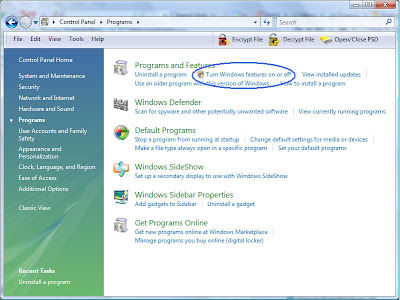
Enable Internet Information Server IIS7
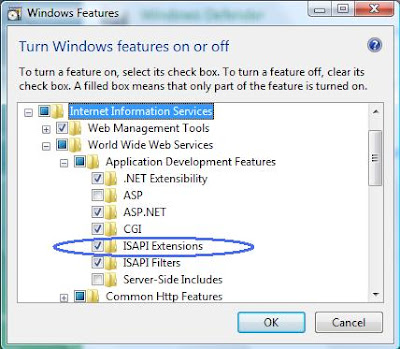
Enable ISAPI Extensions
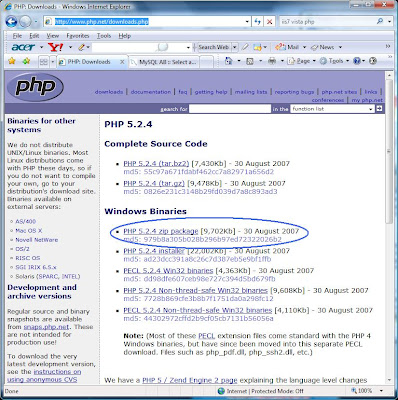
Download PHP
Go to www.php.net/downloads.php to get the latest binary release. Choose the .ZIP version as we won't be running an installer.
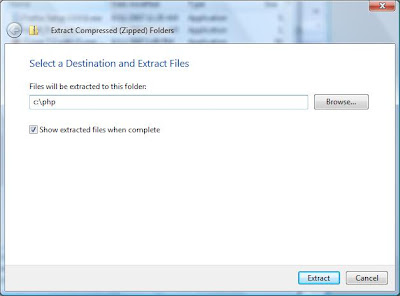
Extract the PHP .zip file to c:\php
Copy php.ini-dist to c:\windows\php.ini
Start / Run / cmd (you can also use the little Windows Key + R, then cmd)
From the command line, do the following:
cd \php
copy php.ini-dist c:\windows\php.ini
If you want to enable MySQL, Edit c:\windows\php.ini
(Otherwise skip to this step)
Since you're still in a command window, just type:
notepad c:\windows\php.ini
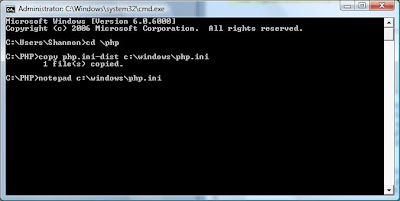
In notepad, Ctrl+F to find the following line:
;extension=php_mysql.dll
remove the semi-colon (to uncomment it)
Now, Ctrl+F to find the following line:
extension_dir = "./"
change it to
extension_dir = "c:\php\ext"
and save the file.
Copy php_mysql.dll to c:\windows\system32
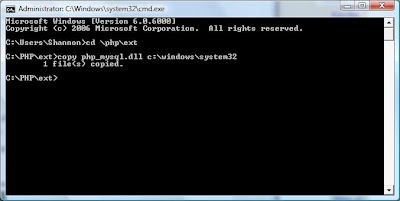
Since you still have an open command window, go there and type:
cd \php\ext
copy php_mysql.dll c:\windows\system32
I used a new window for the sake of screenshot clarity.
Configure IIS7
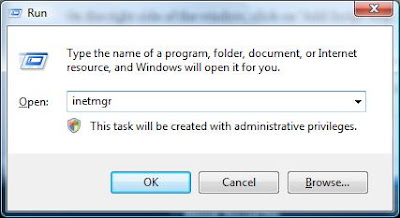
Launch InetMgr (Start / Run / Inetmgr)
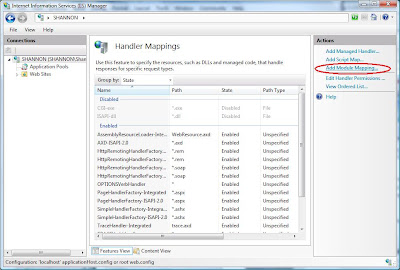
Click on Handler Mappings
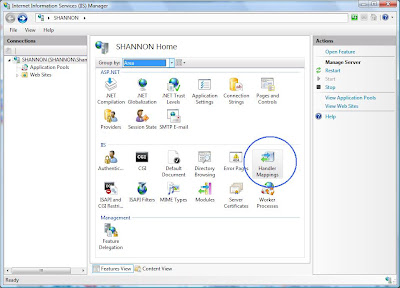
Click on "Add Module Mapping"
Click on "Add Script Map"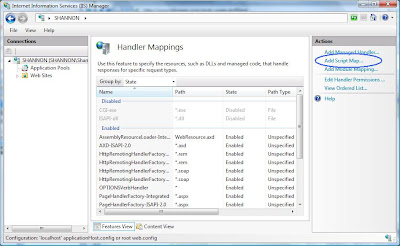
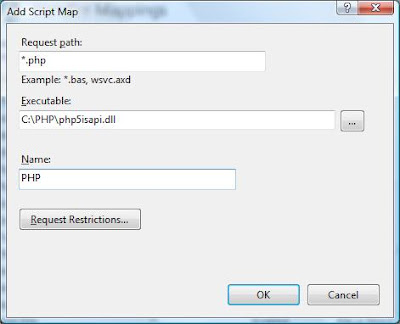
Add a Script Map
Request path: *.php
Executable: C:\PHP\php5isapi.dll
Name: PHP
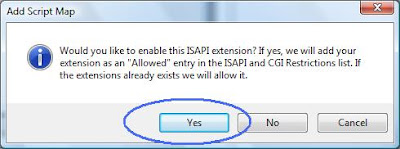
Click Yes on the warning dialog that follows
At this point, actualy, you are done getting PHP to work with IIS7. However, if you are also interested in getting mySql working, there are a few more steps.
Before we download and install mySql, we need to open a port.
Modify the Windows Vista Firewall
Start / Control Panel / Windows Firewall (using classic view)
(HINT) A quick way to get to the Firewall is to use the quick search box above the Vista icon as follows:
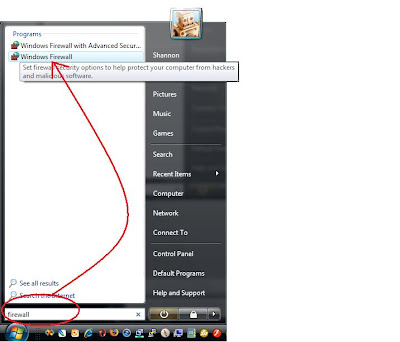
Open port 3306 for mySql
Choose "Change Settings"
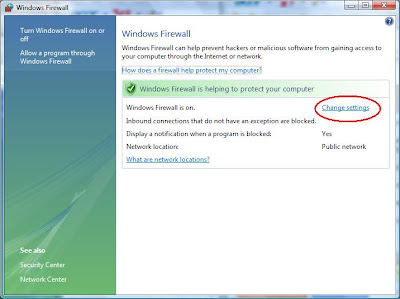
Click the Exceptions tab
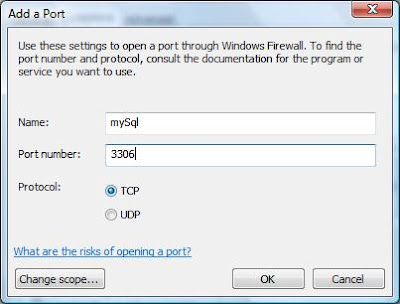
Click the "Add port..." button
Create the following entry
Name: mySql
Port number: 3306
Protocol: TCP
Download the MySQL Installer
I used MySQL 5.1 located at: http://dev.mysql.com/downloads/mysql/5.1.html#win32
Run the Installer
You should be good to go!
Create a test File
To test that all of this effort has been worth the, well, effort, create the following file:
notepad c:\inetpub\wwwroot\phpTest.php
And put the following contents in it:
<?
phpinfo();
?>
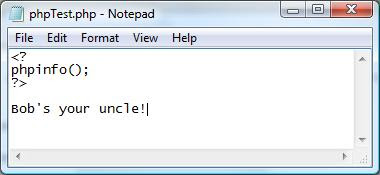
Now, test using the following hyperlink:
http://localhost/phpTest.php
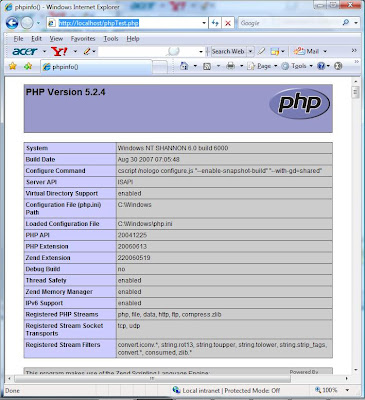
Bob's your uncle!
Shannon Norrell
Yesterday I had a bit of fun (interspersed with periodic cursing and much gnashing of teeth) trying to get my Vista box to serve up PHP pages. I thought I would share the experience and what I learned in the process.
Enable Internet Information Server IIS7

Enable ISAPI Extensions

Download PHP
Go to www.php.net/downloads.php to get the latest binary release. Choose the .ZIP version as we won't be running an installer.

Extract the PHP .zip file to c:\php

Copy php.ini-dist to c:\windows\php.ini
Start / Run / cmd (you can also use the little Windows Key
 + R, then cmd)
From the command line, do the following:
cd \php
copy php.ini-dist c:\windows\php.ini
If you want to enable MySQL, Edit c:\windows\php.ini
(Otherwise skip to this step)
Since you're still in a command window, just type:
notepad c:\windows\php.ini

In notepad, Ctrl+F to find the following line:
;extension=php_mysql.dll
remove the semi-colon (to uncomment it)
Now, Ctrl+F to find the following line:
extension_dir = "./"
change it to
extension_dir = "c:\php\ext"
and save the file.
Copy php_mysql.dll to c:\windows\system32
Since you still have an open command window, go there and type:
cd \php\ext
copy php_mysql.dll c:\windows\system32
I used a new window for the sake of screenshot clarity.

Configure IIS7
Launch InetMgr (Start / Run / Inetmgr)

Click on Handler Mappings

Click on "Add Module Mapping"

Click on "Add Script Map"

Add a Script Map
Request path: *.php
Executable: C:\PHP\php5isapi.dll
Name: PHP

Click Yes on the warning dialog that follows

At this point, actualy, you are done getting PHP to work with IIS7. However, if you are also interested in getting mySql working, there are a few more steps.
Before we download and install mySql, we need to open a port.
Modify the Windows Vista Firewall
Start / Control Panel / Windows Firewall (using classic view)
(HINT) A quick way to get to the Firewall is to use the quick search box above the Vista icon as follows:

Open port 3306 for mySql
Choose "Change Settings"

Click the Exceptions tab
Click the "Add port..." button
Create the following entry
Name: mySql
Port number: 3306
Protocol: TCP

Download the MySQL Installer
I used MySQL 5.1 located at: http://dev.mysql.com/downloads/mysql/5.1.html#win32
Run the Installer
You should be good to go!
Create a test File
To test that all of this effort has been worth the, well, effort, create the following file:
notepad c:\inetpub\wwwroot\phpTest.php
And put the following contents in it:
<?
phpinfo();
?>

Now, test using the following hyperlink:
http://localhost/phpTest.php

Bob's your uncle!
Shannon Norrell
Thursday, September 27, 2007
3jam
Doing some consulting for a company called 3jam, which does "Reply to All" SMS text messaging.Here are some of the press received this week.shannon norrellVirgin Mobile Lights Up Text 2.0 Powered by 3Jam
http://us.blognation.com/2007/09/20/virgin-mobile-lights-up-text-20-powered-by-3jam/
Blognation USA
3jam Lands Virgin Mobile Tie-In
http://www.techcrunch.com/2007/09/20/3jam-lands-virgin-mobile-tie-in/
TechCrunchVirgin Mobile Offers Reply-All SMS through 3jam
http://mashable.com/2007/09/20/virgin-mobile-3jam/
MashableVirgin Mobile Launches New SMS Service
http://www.wirelessweek.com/article.aspx?id=153464
Wireless Week
Tonight's top picks. What will you watch tonight? Preview the hottest shows on Yahoo! TV.
Tuesday, September 25, 2007
Answer to Cross-Domain Scripting for XMLHttpRequest?
Came across this method of avoiding the cross-domain scripting limitation preventing XMLHttpRequest from requesting data from domains outside of your own.
it involves adding a dynamic <SCRIPT> tag.
Seems pretty slick, although I have not tried it as of yet:
Moody friends. Drama queens. Your life? Nope! - their life, your story.
Play Sims Stories at Yahoo! Games.
Interesting Satellite DSL Provider
In doing some consulting for a Telecom-related startup, I ran across this satellite phone service provider that also has DSL.
Too bad they don't cover the Carribean!
Shannon Norrell
Don't let your dream ride pass you by. Make it a reality with Yahoo! Autos.
Thursday, September 20, 2007
Meebo Widget
I will post the answers to Meebo's (in)famous "puzzler" questions later in this blog. Let me know if you're ~puzzling over them...
Want to talk with visitors on your page? Go to http://www.meebome.com/ and get your widget!
Source code
<embed src="http://widget.meebo.com/mm.swf?IwyOglgOmB" type="application/x-shockwave-flash" wmode="transparent" width="160" height="250"></embed>
Want to talk with visitors on your page? Go to http://www.meebome.com/ and get your widget!
Source code
<embed src="http://widget.meebo.com/mm.swf?IwyOglgOmB" type="application/x-shockwave-flash" wmode="transparent" width="160" height="250"></embed>
Friday, August 24, 2007
Cayman Island Software Development Ninja
I have been offered a job in the Cayman Islands.
The name of the company is "Cayman Free Press" and they publish the Cayman Compass (daily newspaper) and several other periodic publications. Three of the five magazines on the coffee table in my room were published by them.
I met with several people yesterday, got a tour of the printing presses and of their surprisingly sophisticated editorial facilities - everyone's got flat panels, running on the latest hardware. They have the capability of creating content in Photoshop, Illustrator, Pagemaker or whatever and of creating the metal plates ultimately used for four-color printing. Pretty interesting, somewhat analog stuff.
This all dovetails nicely in with my plans for circumnavigating the world - it could be considered the first stop of the trip.
As I get back to work there will, of course, be more postings to this blog as I again turn my attentions to technology. I am actually kind of excited!
Shannon Norrell
Be a better Heartthrob. Get better relationship answers from someone who knows.
Yahoo! Answers - Check it out.
Subscribe to:
Posts (Atom)